
Sellorama Vendor Invoice is designed specifically for stores using Sellorama POS. Instead of manually entering every vendor invoice, simply scan the invoice using your scanner. The scanned copy is placed in your designated invoice folder, where Sellorama monitors for new invoices and starts processing as soon as the invoice arrives.
The extracted invoice information can then be reviewed, matched with your Sellorama products, and corrected when necessary before the invoice is confirmed.

Move from a vendor invoice to a confirmed POS transaction in a structured workflow.
Upload Invoice
Start with the vendor invoice document.
Extract Details
Capture invoice and line-item information.
Match Products
Connect invoice items with Sellorama POS products.
Review & Resolve
Check quantities, costs and invoice differences.
Confirm Invoice
Confirm the invoice after the required corrections.


Instead of manually entering every invoice detail, use the Vendor Invoice workflow to extract information and then review it before confirmation.

Vendor invoices don’t always match the expected quantities or totals. Sellorama Vendor Invoice lets the user review these differences and update the invoice information before confirmation.

After Sellorama detects and processes the scanned invoice, the extracted information is presented for review. Users can check the invoice details and line items before moving ahead with confirmation.
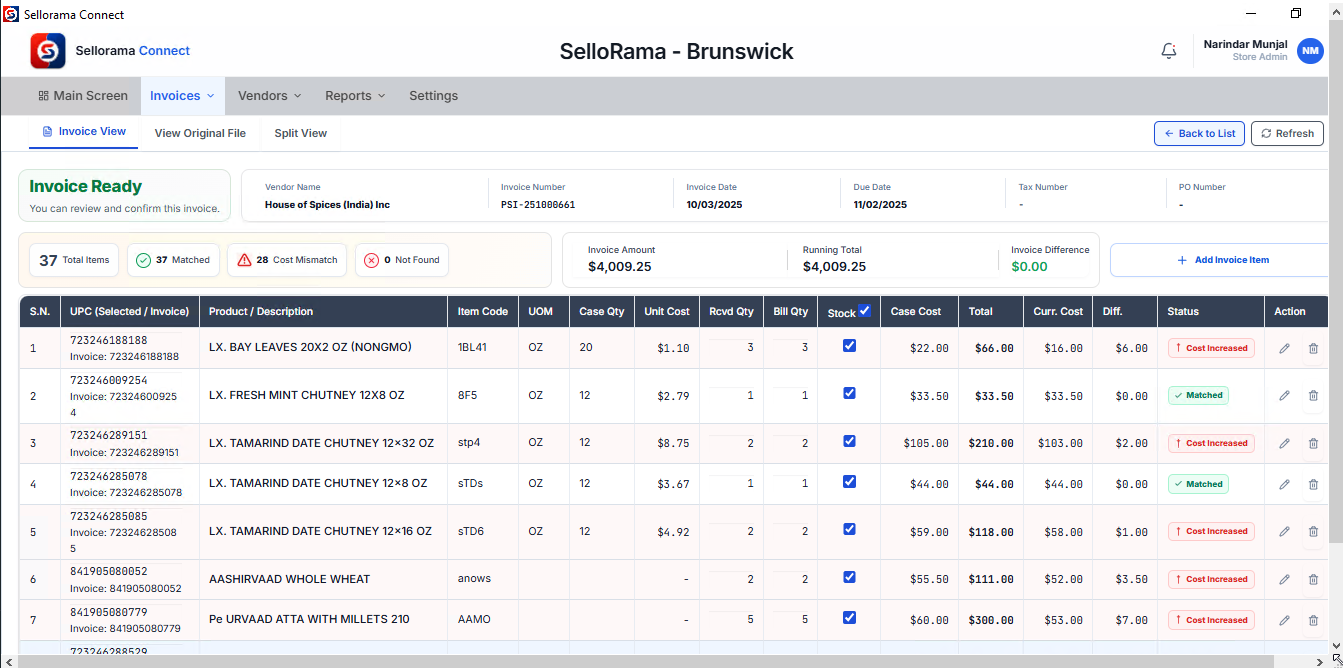
Vendor invoices can contain changed costs or quantities that do not match what the store expects. Sellorama makes these differences visible during review so the user can resolve them before confirmation.